|
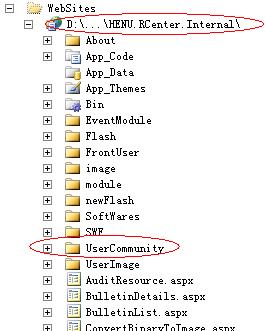
导读前一段时间写代码时经常遇到获取路径问题,总是感觉有点乱,于是就总结了下,大家若有需要可以参考<!--[if !supportLists]-->1. <!--[endif]-->... 前一段时间写代码时经常遇到获取路径问题,总是感觉有点乱,于是就总结了下,大家若有需要可以参考 <!--[if !supportLists]-->1. <!--[endif]-->在.Net中web开发时 <!--[if !supportLists]-->(1) <!--[endif]-->~/在runat=server的控件中会自动被解析为Request.ApplicationPath的值,是当前应用程序的目录 如
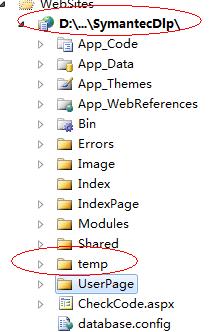
<!--[if !vml]--><!--[endif]--> ~/userCommunity/index.aspx则对应为/HENU.RCenter.Internal/UserCommunity (2) ./表示当前目录 (3)../表示上一层目录 如UserCommunity文件夹下的文件中可以以:../module/来访问module中的文件 2 获取当前请求页面的路径:Request.FilePath 3 获取项目下的文件路径: string path=AppDomain. CurrentDomain .SetUpInformation.ApplicationBase+文件夹+文件 如获取项目下的temp文件夹下文件的路径
<!--[if !vml]--><!--[endif]--> 可以用:string savePath = AppDomain.CurrentDomain.SetupInformation.ApplicationBase + "temp" + @"\" + filename 4 Server.MapPath用法:
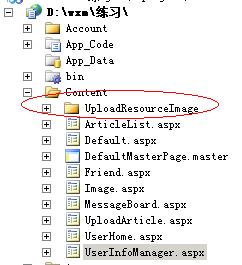
<!--[if !vml]--><!--[endif]--> 若在项目下Content文件夹下的UserInfoManager.aspx代码中写如下路径 this.tempPath = Server.MapPath("UploadResourceImage\\"); 则返回 D:\wxm\练习\Content\UploadResourceImage |
温馨提示:喜欢本站的话,请收藏一下本站!
本站发布的Win7纯净版系统、Win10纯净版和XP纯净版系统仅为个人学习测试使用,请在下载后24小时内删除,不得用于任何商业用途,否则后果自负,请支持购买微软正版软件!
本站所有资源全部来自于网络资源,如侵犯到您的权益,请及时通知我们(peng896066052@126.com),我们会及时处理.
Copyright © 2018-2020 雨林木风下载站