|
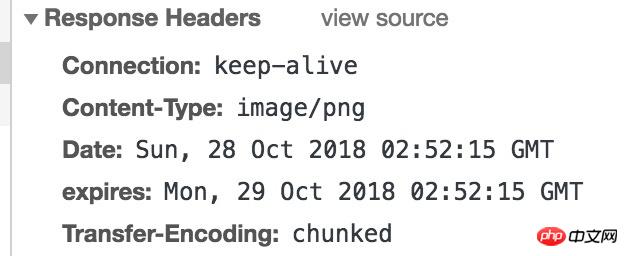
导读网页的本质就是超级文本标记语言,通过结合使用其他的Web技术(如:脚本语言、公共网关接口、组件等),可以创造出功能强大的网页。因而,超级文本标记语言是万维网(Web)编程的基础,也就是说万维网是建立... 网页的本质就是超级文本标记语言,通过结合使用其他的Web技术(如:脚本语言、公共网关接口、组件等),可以创造出功能强大的网页。因而,超级文本标记语言是万维网(Web)编程的基础,也就是说万维网是建立在超文本基础之上的。超级文本标记语言之所以称为超文本标记语言,是因为文本中包含了所谓“超级链接”点。 本篇文章给大家带来的内容是关于使用node解读http缓存的内容,有一定的参考价值,有需要的朋友可以参考一下,希望对你有所帮助。用node搞web服务和直接用tomcat、Apache做服务器不太一样, 很多工作都需要自己做。缓存策略也要自己选择,虽然有像koa-static,express.static这些东西可以用来管理静态资源,但是为了开发或配置时更加得心应手,知其所以然,有了解http缓存的必要。另外,http缓存作为一个前端优化的一个要点,也应该有所了解。 什么是http缓存 RFC 7234 (https://tools.ietf.org/pdf/rfc7234.pdf)指出HTTP缓存是响应消息的本地存储,并且是控制其中消息的存储、检索和删除的子系统。 通俗讲: http协议规定了一些指令, 实现http协议的服务器和浏览器根据这些指令决定要不要以及如何把响应存储起来以备后续使用. http缓存的意义 提高响应速度 减少带宽占用, 省流量 减小服务器压力 不指定任何与缓存有关的指令 这种情况下浏览器不做缓存, 每次都会想服务器请求. 但是比较奇怪的是在nginx的实现中, 这种情况下还是被代理服务器做了缓存.也就是说, 当多次请求同一个资源时, 代理服务器只向源服务器请求一次. 强制缓存 所谓强制缓存就是给出资源的到期时间expires或者有效时间max-age, 在这个时间之内该资源应该被缓存. 如何让一个资源被强缓存 1.expires 这个字段定义了一个资源到期的时间. 看一个实际的例子:
可以看到这个 const d = new Date(Date.now() + 5000);
res.writeHead(200, {
'Content-Type': 'image/png',
'expires': d.toGMTString()
});
res.end(img);2.Cache-Control:[public | private,] max-age=${n}, s-maxage=${m}
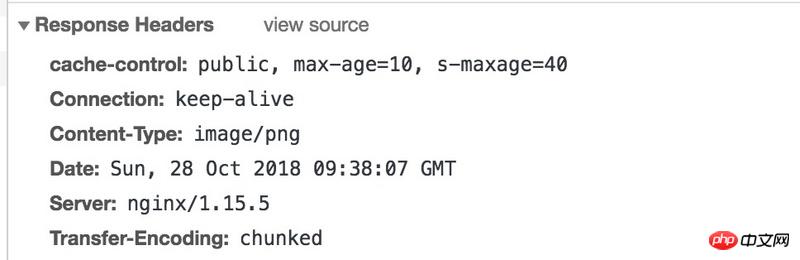
一个实例
协商缓存所谓协商缓存就是客户端想用缓存资源时先向服务器询问, 如果服务器如果认为这个资源没有过期, 可以继续用则给出304响应, 客户端继续使用原来的资源; 否则给出200, 并在响应body加上资源, 客户端使新的资源. 1.Last-Modified与If-Modified-Since 这个机制是, 服务器在响应头中加上 2.Etag与If-None-Match
这个与上面的 演示第8, 10 如何选择缓存策略https://tools.ietf.org/pdf/rfc7234.pdf 附录1.演示代码 const http = require('http');
const fs = require('fs');
let etag = 0;
let tpl = fs.readFileSync('./index.html');
let img = fs.readFileSync('./test.png');
http.createServer((req, res) => {
etag++; // 我是个假的eTag
console.log('--->', req.url);
switch (req.url) {
// 模板
case '/index':
res.writeHead(200, {
'Content-Type': 'text/html',
'Cache-Control': 'no-store'
});
res.end(tpl);
break;
// 1. 不给任何与缓存相关的头, 任何情况下, 既不会被浏览器缓存, 也不会被代理服务缓存
case '/img/nothing_1':
res.writeHead(200, {
'Content-Type': 'image/png'
});
res.end(img);
break;
// 2. 设置了no-cache表明每次要使用缓存资源前需要向服务器确认
case '/img/cache-control=no-cache_2':
res.writeHead(200, {
'Content-Type': 'image/png',
'cache-control': 'no-cache'
});
res.end(img);
break;
// 3. 设置max-age表示在浏览器最多缓存的时间
case '/img/cache-control=max-age_3':
res.writeHead(200, {
'Content-Type': 'image/png',
'cache-control': 'max-age=10'
});
res.end(img);
break;
// 4. 设置了max-age s-maxage public: public 是说这个资源可以被服务器缓存, 也可以被浏览器缓存,
// max-age意思是浏览器的最长缓存时间为n秒, s-maxage表明代理服务器的最长缓存时间为那么多秒
case '/img/cache-control=max-age_s-maxage_public_4':
res.writeHead(200, {
'Content-Type': 'image/png',
'cache-control': 'public, max-age=10, s-maxage=40'
});
res.end(img);
break;
// 设置了max-age s-maxage private: private 是说这个资源只能被浏览器缓存, 不能被代理服务器缓存
// max-age说明了在浏览器最长缓存时间, 这里的s-maxage实际是无效的, 因为不能被代理服务缓存
case '/img/cache-control=max-age_s-maxage_private_5':
res.writeHead(200, {
'Content-Type': 'image/png',
'cache-control': 'private, max-age=10, s-maxage=40'
});
res.end(img);
break;
// 7. 可以被代理服务器缓存, 确不能被浏览器缓存
case '/img/cache-control=private_max-age_7':
res.writeHead(200, {
'Content-Type': 'image/png',
'cache-control': 'public, s-maxage=40'
});
res.end(img);
break;
// 8. 协商缓存
case '/img/talk_8':
let stats = fs.statSync('./test.png');
let mtimeMs = stats.mtimeMs;
let If_Modified_Since = req.headers['if-modified-since'];
let oldTime = 0;
if(If_Modified_Since) {
const If_Modified_Since_Date = new Date(If_Modified_Since);
oldTime = If_Modified_Since_Date.getTime();
}
mtimeMs = Math.floor(mtimeMs / 1000) * 1000; // 这种方式的精度是秒, 所以毫秒的部分忽略掉
console.log('mtimeMs', mtimeMs);
console.log('oldTime', oldTime);
if(oldTime < mtimeMs) {
res.writeHead(200, {
'Cache-Control': 'no-cache',
// 测试发现, 必须要有max-age=0 或者no-cache,或者expires为当前, 才会协商, 否则没有协商的过程
'Last-Modified': new Date(mtimeMs).toGMTString()
});
res.end(fs.readFileSync('./test.png'));
}else {
res.writeHead(304);
res.end();
}
// 9. 设置了expires, 表示资源到期时间
case '/img/expires_9':
const d  = new Date(Date.now() + 5000);
res.writeHead(200, {
    'Content-Type': 'image/png',
    'expires': d.toGMTString()
});
res.end(img);
break;
// 10. 设置了expires, 表示资源到期时间
case '/img/etag_10':
const If_None_Match = req.headers['if-none-match'];
console.log('If_None_Match,',If_None_Match);
if(If_None_Match != etag) {
res.writeHead(200, {
'Content-Type': 'image/png',
'Etag': String(etag)
});
res.end(img);
}else {
res.statusCode = 304;
res.end();
}
break;
// 11. no-store 能协商缓存吗? 不能, 请求不会带if-modified-since
case '/img/no-store_11':
const stats2 = fs.statSync('./test.png');
let mtimeMs2 = stats2.mtimeMs;
let If_Modified_Since2 = req.headers['if-modified-since'];
let oldTime2 = 0;
if(If_Modified_Since2) {
const If_Modified_Since_Date = new Date(If_Modified_Since2);
oldTime2 = If_Modified_Since_Date.getTime();
}
mtimeMs2 = Math.floor(mtimeMs2 / 1000) * 1000; // 这种方式的精度是秒, 所以毫秒的部分忽略掉
console.log('mtimeMs', mtimeMs2);
console.log('oldTime', oldTime2);
if(oldTime2 < mtimeMs2) {
res.writeHead(200, {
'Cache-Control': 'no-store',
// 测试发现, 必须要有max-age=0 或者no-cache,或者expires为当前, 才会协商, 否则没有协商的过程
'Last-Modified': new Date(mtimeMs2).toGMTString()
});
res.end(fs.readFileSync('./test.png'));
}else {
res.writeHead(304);
res.end();
}
default:
res.statusCode = 404;
res.statusMessage = 'Not found',
res.end();
}
}).listen(1234);2.测试用代理服务器nginx配置 不要问我这是个啥, 我是copy的 worker_processes 8;
events {
worker_connections 65535;
}
http {
include mime.types;
default_type application/octet-stream;
charset utf-8;
log_format main '$http_x_forwarded_for $remote_addr $remote_user [$time_local] "$request" '
'$status $body_bytes_sent "$http_referer" '
'"$http_user_agent" "$http_cookie" $host $request_time';
sendfile on;
tcp_nopush on;
tcp_nodelay on;
keepalive_timeout 65;
proxy_connect_timeout 500;
#跟后端服务器连接的超时时间_发起握手等候响应超时时间
proxy_read_timeout 600;
#连接成功后_等候后端服务器响应的时间_其实已经进入后端的排队之中等候处理
proxy_send_timeout 500;
#后端服务器数据回传时间_就是在规定时间内后端服务器必须传完所有数据
proxy_buffer_size 128k;
#代理请求缓存区_这个缓存区间会保存用户的头信息以供Nginx进行规则处理_一般只要能保存下头信息即可
proxy_buffers 4 128k;
#同上 告诉Nginx保存单个用的几个Buffer最大用多大空间
proxy_busy_buffers_size 256k;
#如果系统很忙的时候可以申请更大的proxy_buffers 官方推荐*2
proxy_temp_file_write_size 128k;
#设置web缓存区名为cache_one,内存缓存空间大小为12000M,自动清除超过15天没有被访问过的缓存数据,硬盘缓存空间大小200g
#要想开启nginx的缓存功能,需要添加此处的两行内容!
#设置Web缓存区名称为cache_one,内存缓存空间大小为500M,缓存的数据超过1天没有被访问就自动清除;访问的缓存数据,硬盘缓存空间大小为30G
proxy_cache_path /usr/local/nginx/proxy_cache_path levels=1:2 keys_zone=cache_one:500m inactive=1d max_size=30g;
#创建缓存的时候可能生成一些临时文件存放的位置
proxy_temp_path /usr/local/nginx/proxy_temp_path;
fastcgi_connect_timeout 3000;
fastcgi_send_timeout 3000;
fastcgi_read_timeout 3000;
fastcgi_buffer_size 256k;
fastcgi_buffers 8 256k;
fastcgi_busy_buffers_size 256k;
fastcgi_temp_file_write_size 256k;
fastcgi_intercept_errors on;
client_header_timeout 600s;
client_body_timeout 600s;
client_max_body_size 100m;
client_body_buffer_size 256k;
gzip off;
gzip_min_length 1k;
gzip_buffers 4 16k;
gzip_http_version 1.1;
gzip_comp_level 9;
gzip_types text/plain application/x-javascript text/css application/xml text/javascript;
gzip_vary on;
include vhosts/*.conf;
server {
listen 80;
server_name localhost;
location / {
proxy_pass http://127.0.0.1:1234;
proxy_set_header Host $http_host;
proxy_set_header X-Real-IP $remote_addr;
proxy_set_header X-Forwarded-For $proxy_add_x_forwarded_for;
proxy_redirect off;
proxy_cache cache_one;
#此处的cache_one必须于上一步配置的缓存区域名称相同
proxy_cache_valid 200 304 12h;
proxy_cache_valid 301 302 1d;
proxy_cache_valid any 1h;
#不同的请求设置不同的缓存时效
proxy_cache_key $uri$is_args$args;
#生产缓存文件的key,通过4个string变量结合生成
expires off;
#加了这个的话会自己修改cache-control, 写成off则不会
proxy_set_header X-Forwarded-Proto $scheme;
}
}
}以上就是使用node解读http缓存的内容的详细内容,更多请关注php中文网其它相关文章! 网站建设是一个广义的术语,涵盖了许多不同的技能和学科中所使用的生产和维护的网站。 |
温馨提示:喜欢本站的话,请收藏一下本站!
本站发布的Win7纯净版系统、Win10纯净版和XP纯净版系统仅为个人学习测试使用,请在下载后24小时内删除,不得用于任何商业用途,否则后果自负,请支持购买微软正版软件!
本站所有资源全部来自于网络资源,如侵犯到您的权益,请及时通知我们(peng896066052@126.com),我们会及时处理.
Copyright © 2018-2020 雨林木风下载站